Resolving security vulnerabilities typically involve you updating the affected core version, plugin or theme to the latest version.
When you do this, a few things will happen:
The vulnerability will disappear from the Vulnerabilities screen
In the Website Area > WordPress > Vulnerabilities screen, you’ll see a list of all current security vulnerabilities for that website.
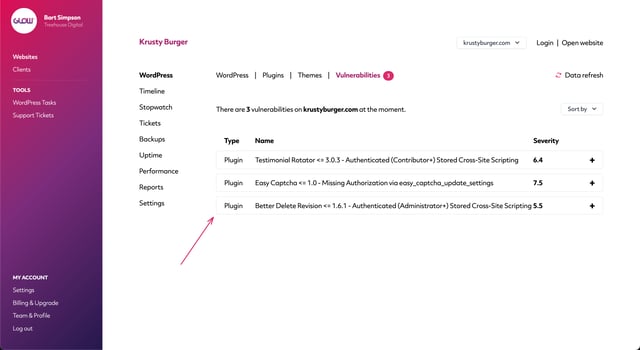
When you resolve a vulnerability, it will disappear from this screen.
The number of vulnerabilities on the Websites screen will decrease
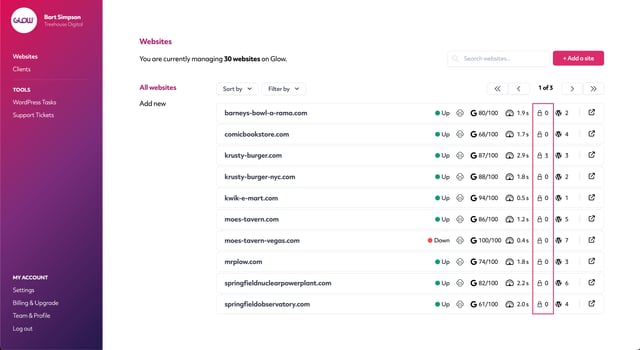
On the Websites screen in the main left hand menu, you’ll see various data points for each website on the right side of your screen.
The data point with the padlock icon indicates the number of security vulnerabilities currently present on that website.
Whenever you resolve a vulnerability, this number next to the padlock icon will decrease.
It’ll get recorded to Timeline
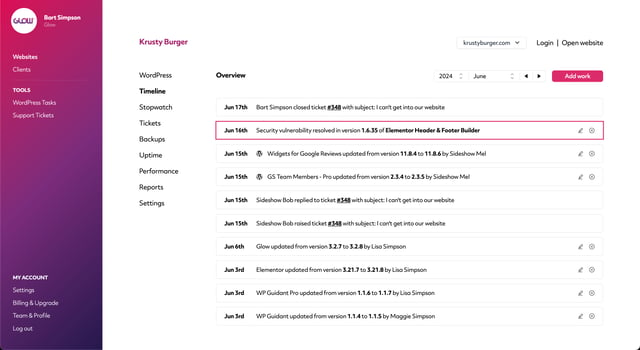
Timeline keeps a record of activity for each website in your account.
Whenever you resolve a vulnerability, it’ll get recorded to Timeline for that website.
It’ll show in client reports
As long as you include the Security section in your client reports, all resolved vulnerabilities will appear and be displayed to your client.

