When you setup Reseller, you start by adding a certain number of Reseller websites to your account. Let’s say you add 50 websites. You can then add those 50 websites across each of your Reseller Agency’s dashboards.
Once you’ve added all 50, you’ll need to purchase more Reseller websites before you can connect any new ones.
Note: Reseller is a premium feature and you’ll be charged $2/website/month on for each Reseller website that you add, on top of your regular plan rate.
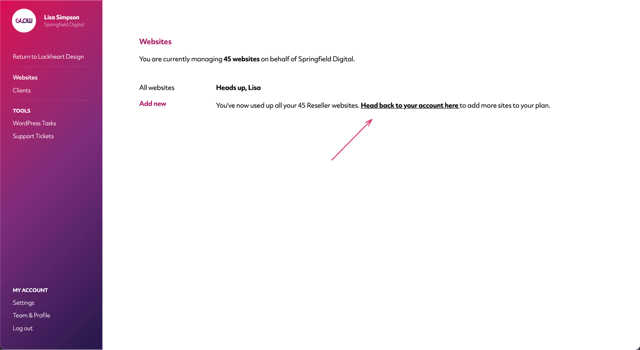
Limit notice in Reseller dashboard
To add websites to a Reseller Agency’s dashboard, you follow the steps in Websites > Add new.
However, if you’ve hit the limit of Reseller websites in your account, you’ll see a notice on screen, guiding you back to the Reseller > Billing section of your account where you can purchase more websites.
Reseller Billing
You can always keep a track of how many websites you’ve purchased and how many of those are being used, in the Reseller > Billing section of your account.
Here you’ll see the following information in relation to the websites limit:
- Reseller websites you’re paying for – this is the total number of Reseller websites that you’ve purchased to date
- Reseller websites you’ve added – this is the number of Reseller websites that you’ve connected across your Reseller Agencies’ dashboards
- Reseller websites you can still add – this is the remaining number of Reseller websites that you can still connect, before you hit the limit

